People trust images more than words. Yet images often hide their real source. For instance, a viral picture can spread fast, collect likes, and shape opinions before anyone checks its origin. That gap creates confusion, misuse, and sometimes harm.
Reverse image search solves the issue. But many tools feel slow or confusing. Reversely.ai Chrome Extension takes a different path. It brings reverse image search directly into daily browsing. One click replaces long uploads and tab switching. The result feels quick, practical, and built for real users who value clarity and speed.
Overview of Reversely.ai Chrome Extension
Reversely.ai Chrome Extension works as a lightweight tool that sits inside the browser without causing a distraction. It allows users to search visually without leaving their current page. Instead of downloading images or opening separate sites, users can act at the exact moment curiosity appears.
The extension focuses on screenshots rather than saved files, which matches how people browse today. This approach saves time and removes extra steps. Reversely.ai aims to keep reverse image search simple, direct, and reliable for everyday use.
How to Download this Extension?
You can download this extension in two different ways.
Download from Chrome Web Store
- Open Chrome Web Store
- Search “Reversely.ai – Powerful Reverse Image Tool” on the Web Store
- Click “Add to Chrome”
- The extension will be downloaded within a few seconds
Download from Reversely.ai
- Visit Reversely.ai
- You will see a floating button of the Reversely Chrome Extension.
- Click on the “Download Chrome Extension”
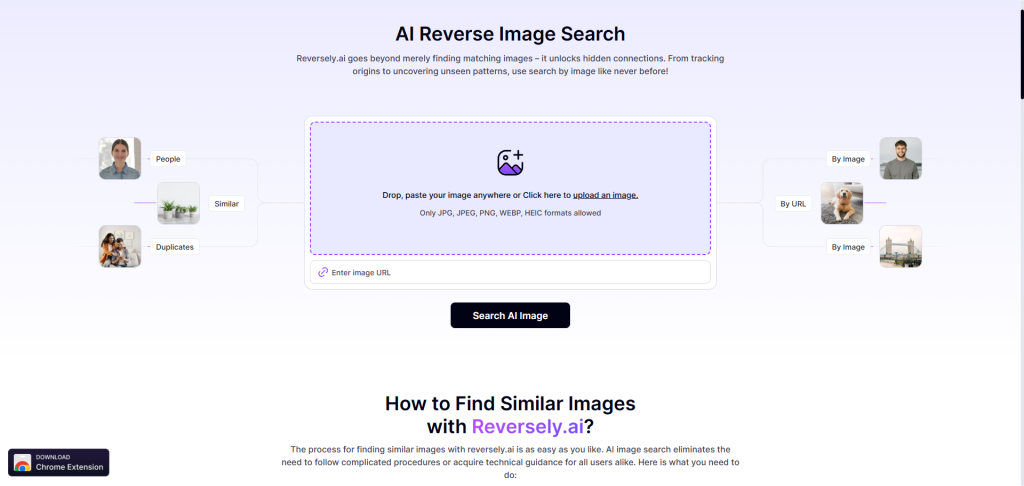
- It will lead you to the Chrome Web Store
- Then, click “Add to Chrome”
How to Search by Image with Reversely.ai Chrome Extension?
You can use Reversely.ai chrome extension to search similar images by:
- Right-Click Method: Simply right-click a photo on a webpage and conduct a reverse search through Reversely.
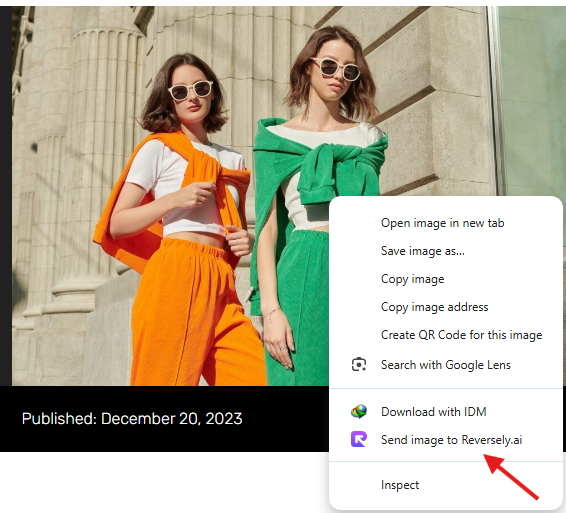
Or
- Crop & Search: Click the browser extension, crop the picture, and hit Search.
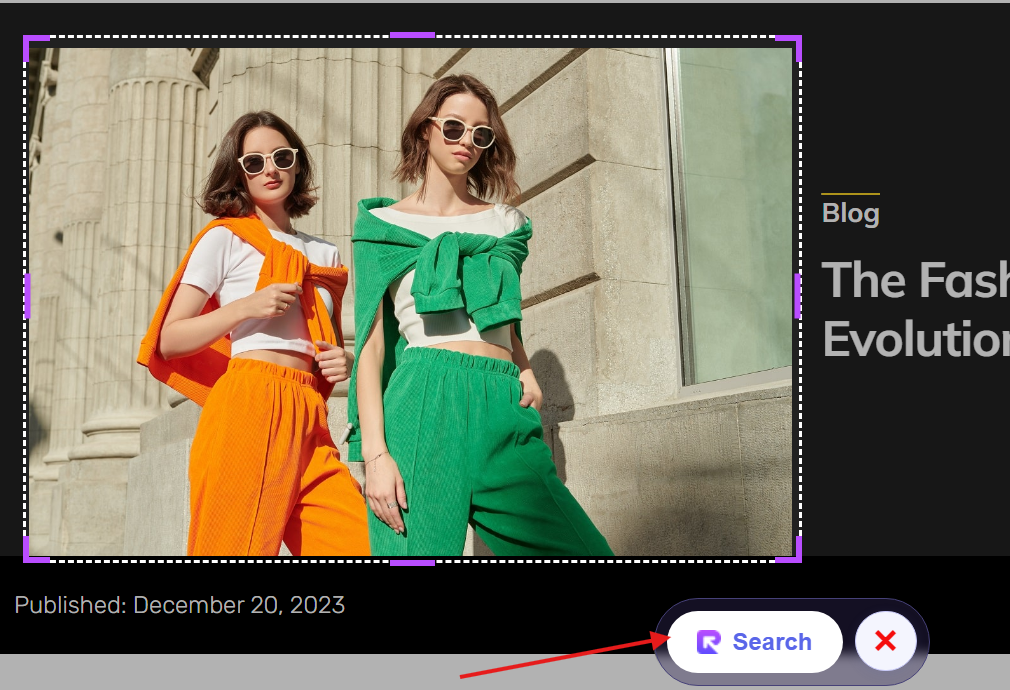
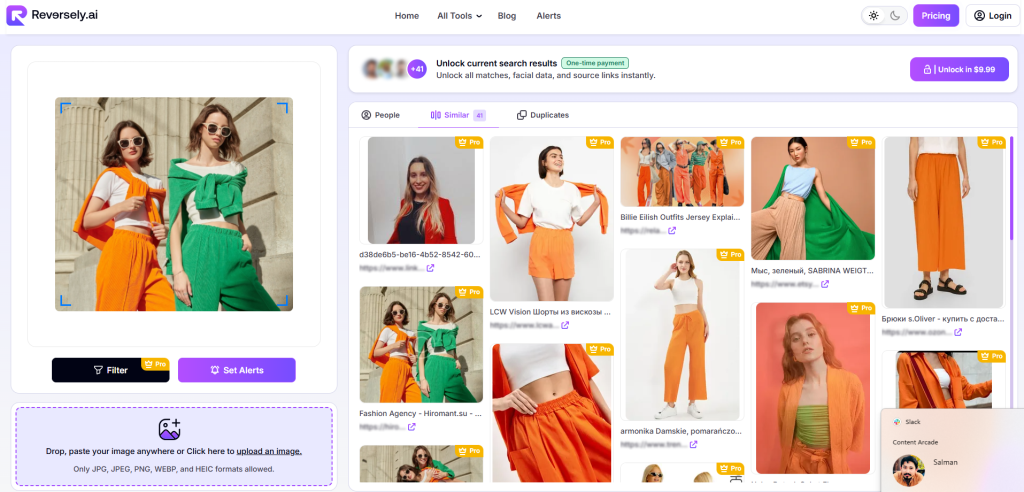
Review Results: As you search with either method, the extension will start the image search process, and you’ll be directed to the platform where you can explore similar pictures.
Is Reversely.ai Extension Safe to Use?
- Privacy-First Design: The extension process searches without collecting or storing your personal information.
- Minimal Access Scope: Permissions are limited strictly to features necessary for image analysis.
- Encrypted Communication: All data transfer occurs through secure, encrypted network connections.
- No Personal Tracking: User behavior, browsing activity, and identity remain completely untracked.
- Regular Security Updates: Ongoing updates ensure protection against vulnerabilities and security threats.
Why Users Should Use Reversely.ai Chrome Extension?
Faster Visual Checks
Speed shapes the entire browsing experience. Reversely.ai removes delays by cutting out uploads and manual searches. Users have multiple options to search by image without leaving the page.
This flow feels natural during research, shopping, or content review. Quick checks help users confirm sources before sharing images. That habit reduces mistakes and saves effort. Instead of breaking focus, the extension supports smooth browsing with minimal interruption. The value lies in time saved and confidence gained during every visual search session.
No File Downloads
Saving images creates clutter and wastes storage space. Reversely.ai avoids that problem by using screenshots directly from the browser. Even if you want to search by an image uploaded on a website, you don’t need to download it first.
It also helps people who work on shared or restricted devices. By skipping file handling, the extension keeps workflows simple. Less friction means users perform checks more often. Frequent use builds better habits around image verification and online awareness.
Simple User Flow
Many tools fail because they add steps that confuse users. Reversely.ai keeps the process short and clear from start to finish. The interface shows only what users need at that moment. There are no extra menus or hidden options.
This clarity helps new users feel comfortable within seconds. Experienced users also benefit from the lack of clutter. A simple flow encourages regular use without frustration. That balance between ease and function makes the extension practical for daily browsing.
Accurate Match Results
Accuracy decides whether reverse image search feels useful or pointless. Reversely.ai focuses on showing relevant visual matches instead of random results. Users can compare similar images and judge context quickly.
This helps with fact-checking, content research, and image verification. Reliable matches build trust over time. When users see consistent results, they rely on the tool with confidence. Moreover, accurate output reduces doubt and helps users make informed decisions without second-guessing their findings.
Privacy Friendly Design
Online tools often raise concerns about data handling. Reversely.ai respects user privacy by limiting unnecessary data collection. Searches serve one purpose only, which is image matching. The extension avoids storing personal browsing history.
This focus creates peace of mind during use. People feel safer checking sensitive or work-related visuals. Privacy awareness matters more than ever. A tool that respects user boundaries earns long-term trust and wider adoption among cautious users.
Useful For Professionals
Many professionals work with images daily. Journalists verify sources, marketers check originality, and designers find references. Reversely.ai fits naturally into these workflows. The extension saves time during research and review tasks. It also supports faster decisions during meetings or deadlines.
Professionals appreciate tools that respect their pace. By staying inside the browser, Reversely.ai becomes part of the work routine rather than an extra task. That practical value speaks strongly to working users.
Beginner Friendly Tool
Not everyone understands reverse image search techniques. Reversely.ai welcomes beginners with a gentle learning curve. The tool avoids technical language and complex settings. New users can start without tutorials or guides.
This ease builds confidence quickly. When people succeed on their first attempt, they continue using the tool. Beginner-friendly design expands access and reduces hesitation. Anyone can verify images without prior knowledge or advanced skills.
FAQs
What does Reversely.ai Chrome extension do?
Reveresely.ai allows users to perform reverse image searches directly from any webpage. Using the extension, you can easily find image sources, verify photos, and search similar images across the web.
Does Reversely.ai store my data?
No. The platform doesn’t store your user searches or personal information. Searches are always processed securely and only when initiated by the user.
Is the extension suitable for professional use?
Absolutely! It’s helpful for everyone, including designers, researchers, journalists, content creators, etc. It simplifies image verification, copyright checks, and source discovery.
Do I need an account to use the Reversely.ai extension?
No account or sign-up is required to use this extension. You can install and start using it immediately without sharing personal details.
Conclusion
Images influence opinions faster than text, so checking them matters more than ever. Reversely.ai Chrome Extension offers a clear and practical solution without slowing users down. Its screenshot-based approach fits modern browsing habits naturally.
The extension avoids clutter, protects privacy, and delivers reliable results. Professionals and casual users both gain value from its simple flow. Instead of overloading features, Reversely.ai focuses on doing one task well. That focus makes it a dependable companion for anyone who wants clarity behind the images they see online.